

Top 5 Color Grading Workstations in the USA for 2026
Published on Monday, January 26, 2026
Color grading workstations focus on enhancing the visual tone and mood of video and film through precise color correction and creative stylization. These systems pair advanced software with specialized hardware such as control panels, calibrated monitors, and GPU-accelerated workstations to deliver accurate color rendition, real-time playback, and repeatable results. In the USA market, buyers value systems that support HDR and wide color gamut workflows, integrate seamlessly with industry-standard tools like DaVinci Resolve and Avid, and offer tactile controls for faster, more intuitive adjustments. Demand in 2026 reflects trends toward higher-resolution content, AI-assisted grading, remote collaboration, and ergonomic, upgradeable setups that suit independent creators, boutique post houses, and large studio pipelines alike.
Top Picks Summary
DaVinci Resolve Advanced Panel
The DaVinci Resolve Advanced Panel is the flagship, best-in-class control surface for high-end color grading workstations, offering the most complete set of tactile controls and the tightest integration with DaVinci Resolve software. Its precision, motorized knobs and full transport/menus accelerate complex grading sessions and justify the premium cost for facilities where throughput and consistency matter most. Compared with smaller or modular options in this list, it delivers unmatched end-to-end workflow speed for professional grading suites while costing more upfront and requiring a more robust workstation setup.
Tangent Element Panel Set
The Tangent Element Panel Set is a modular, scalable solution that balances professional features with lower total cost of ownership, making it a market-leading choice for customizable color grading workstations. Its interchangeable modules allow facilities to expand or reconfigure as needs change, offering a technical and financial flexibility that larger fixed panels lack. Against the other products here it stands out for upgradeability and multi‑software support, giving studios a cost-effective path to professional tactile control without the single-vendor premium of top-tier integrated panels.

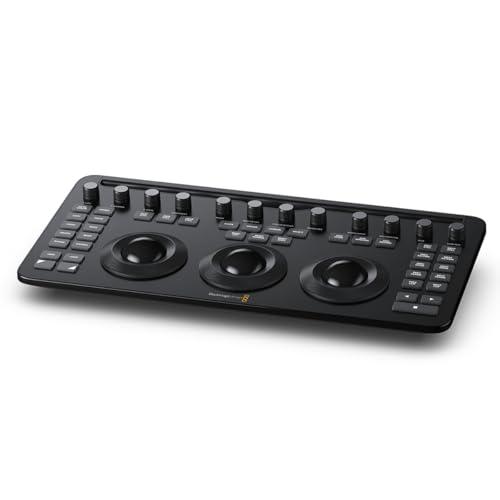
Blackmagic Design DaVinci Resolve Mini Panel
The DaVinci Resolve Mini Panel provides a compact, Resolve-native control surface that brings most of the Advanced Panel's workflow advantages to smaller color grading workstations or remote setups at a mid-range price. It trades some physical controls for portability and a lower hardware footprint while preserving deep software integration, making it a strong value for solo colorists and small suites. Compared with Tangent's modular offerings and entry-level Ripple, the Mini Panel is often chosen for its seamless Resolve pairing and familiar grading layout, though it lacks the expandability of modular systems.

Tangent Ripple Control Panel
The Tangent Ripple Control Panel is an entry-level, highly affordable surface designed to add essential tactile control to color grading workstations without a large capital outlay. Its compact form and focused control set make it ideal as a second station or for budget-conscious setups where basic trackball and knob control still significantly improves grading speed over a mouse. While it lacks the depth and expandability of the Element set or the Resolve-native feature set of Blackmagic panels, Ripple delivers the strongest price-to-function ratio for simple grading stations.

Avid Artist Color
The Avid Artist Color is a compact, professionally built control surface aimed at broadcast and post-production environments that need dependable tactile grading controls integrated into broader Avid-centric workflows. It provides a solid middle ground between entry-level panels and full-size surfaces, offering reliability and a familiar ergonomics for editors and colorists working across Avid and other NLEs, though it does not match Blackmagic panels' native Resolve feature set. In the context of color grading workstations, Artist Color is a sensible choice for mixed-tool facilities seeking durable hardware without the premium of flagship Resolve panels.

Scientific Evidence Behind Color Grading Benefits
A range of perceptual science and applied research supports the practical benefits of professional color grading and calibrated workflows. Studies in vision science and media psychology show that intentional color and contrast choices influence viewer emotion, focus, and recall. Technical research and industry testing demonstrate that calibrated displays and objective color difference metrics reduce variability between devices, improving consistency across delivery platforms. Additionally, advances in display technology such as HDR and wide color gamut have measurable effects on perceived image realism and dynamic range when properly graded.
Color psychology research shows hue, saturation, and contrast affect emotional response and viewer attention, helping storytellers set tone.
Display calibration and color management reduce Delta E variation, producing more predictable and repeatable results across monitors and theaters.
Human vision studies indicate that increased dynamic range and accurate luminance mapping improve perceived realism and detail in highlights and shadows.
Workflow studies find that tactile control surfaces and real-time GPU acceleration significantly speed grading sessions and reduce repetitive mouse-driven adjustments.
Published industry tests on HDR pipelines confirm greater perceived image quality when codecs, metadata, and graded masters follow best-practice standards.
Frequently Asked Questions
Should I buy the DaVinci Resolve Advanced Panel for grading?
Choose the DaVinci Resolve Advanced Panel if you want the most complete tactile control set for high-end color grading workstations, with native, deepest-level integration with DaVinci Resolve node-based workflows, plus an average rating of 4.9.
What exact control features does the Mini Panel have?
The Blackmagic Design DaVinci Resolve Mini Panel includes three precision trackballs and a bank of tactile rotary controls, with seamless native control of DaVinci Resolve grading tools and timelines.
How does the DaVinci Resolve Mini Panel price compare value?
The Blackmagic Design DaVinci Resolve Mini Panel lists at $2,254.50 USDand delivers three precision trackballs plus native DaVinci Resolve control of grading tools and timelines, with an average rating of 4.5.
Is the Tangent Element Panel Set compatible with Nuke and Resolve?
Yes—the Tangent Element Panel Set lists broad software compatibility including Resolve, Baselight, and Nuke, and it has an average rating of 4.6.
Conclusion
In the USA market for 2026, top color grading workstations blend software power, calibrated displays, and hands-on hardware to meet the needs of professionals and serious creators. The DaVinci Resolve Advanced Panel delivers the highest-end tactile control and integration for large post facilities and is the best overall choice for dedicated colorists. The Tangent Element Panel Set offers modular flexibility for studios that want scalable control surfaces. The Blackmagic Design DaVinci Resolve Mini Panel provides a compact, cost-effective option for smaller suites and solo artists. The Tangent Ripple Control Panel is a portable, entry-friendly choice that retains professional controls, and the Avid Artist Color fits well into Avid-centric editing environments. I hope you found what you were looking for; you can refine or expand your search using the search to compare features, pricing, and compatibility across these models.