

Top 6 High-Performance Enterprise Workstations in the USA for 2026
Published on Wednesday, February 25, 2026
High-performance enterprise workstations are engineered to meet the needs of professionals who rely on demanding applications such as 3D modeling, video editing, and complex data analysis. In the USA, enterprises and creative sectors increasingly prefer these business desktops because they combine the latest processors, professional graphics, ECC memory, and validated storage options to deliver consistent, certificated performance and reliability. These systems are optimized for multi-threaded simulation, GPU-accelerated rendering, and AI-assisted workflows, and they are often ISV certified for industry software such as CAD, VFX, and scientific compute. Buyers prioritize vendor support, manageability, expansion capacity, and total cost of ownership, which makes enterprise workstations an attractive investment for teams that need predictable performance, minimal downtime, and scalable configurations.
Top Picks Summary
Dell Precision 7875 Tower
The Dell Precision 7875 Tower is positioned as a versatile high-performance enterprise workstation that balances raw multi-threaded compute with broad expandability and enterprise-grade manageability, making it a go-to for mixed workloads. Compared with the HP Z8 Fury's focus on absolute core density and BOXX's niche engineering rigs, the 7875 offers a stronger price-to-service ratio for organizations that need certified drivers, remote management, and predictable lifecycle support at scale. Its financial advantage lies in Dell's global support and deployment tooling, which reduces total cost of ownership for large fleets.

HP Z8 Fury G5 Workstation
The HP Z8 Fury G5 claims market-leader status for users demanding maximum CPU and GPU density in a single chassis, delivering uncompromising throughput for simulation, rendering, and scientific compute. Compared to Dell's more balanced offering and Apple's compact memory-constrained Studio, the Z8 Fury stands out for its extreme expandability and headroom for multiple high-end accelerators, albeit at a higher acquisition cost that enterprise customers justify with peak-performance gains on parallel workloads. Its technical advantage is raw scale—ideal where absolute compute ceiling and ISV certification matter most to minimize runtime costs on heavy projects.

Lenovo ThinkStation P620
The Lenovo ThinkStation P620 is the first workstation powered by AMD Ryzen Threadripper PRO processors, pushing the boundaries of performance in multi-threaded applications. Its versatile design allows for extensive customization and expansion, meeting the unique needs of various industries, from gaming to architecture. The P620's robust build, along with its extensive certification for various professional software, promises both performance and stability. This makes it an excellent choice for users who require top-tier performance without compromise.

Apple Mac Studio
The Apple Mac Studio M2 Ultra excels for creative and media production teams that prioritize single-socket efficiency, tight system integration, and software optimization, delivering strong real-world performance per watt and seamless macOS workflows. Versus the larger Windows towers here, the Mac Studio trades expandability for exceptional out-of-the-box performance, lower operational power draw, and predictable performance on optimized apps, making it a financially attractive choice for studios focused on throughput and lower ongoing power/cooling costs. Its unique technical advantage is Apple’s unified architecture that reduces complexity for many content pipelines.

BOXX APEXX W4L
BOXX APEXX W4L targets professionals who need purpose-built, ISV-certified workstations with extreme thermal design and tuning for sustained peak performance in simulation, ray tracing, and CAD. Compared with commodity enterprise towers like Dell and HP, BOXX emphasizes tailored engineering, factory overclocking options, and white-glove support that shortens time-to-solution for specialized workloads, though that premium engineering typically comes with a higher upfront price. The key advantage is predictable, validated performance on niche professional applications that reduces iteration time and project costs for high-stakes engineering teams.
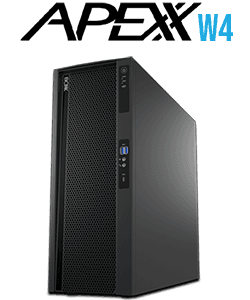
Where to buy BOXX APEXX W4L in USA: the trusted retailers we track in this market, with the best price we have observed at each. Prices are checked regularly and can change, and the retailer confirms the final price at checkout.
We may earn a commission on purchases. It never affects our rankings.
$5,499 – $24,999
Puget Systems Genesis II
Puget Systems Genesis II is a custom-focused workstation designed for organizations that value meticulous component selection, third-party benchmarking, and tuned software stacks to maximize performance for their specific workloads. Unlike mass-market vendors, Puget’s strength is in tailored build guidance and transparency—customers can optimize for cost-efficiency and performance per dollar more precisely than with preconfigured towers, offering strong ROI for specialized workflows. Its financial plus is lowered long-term operational waste and better right-sizing, which reduces unnecessary spend on overprovisioned hardware.

What Research and Benchmarks Show
Peer-reviewed research and industry benchmark suites consistently demonstrate that modern enterprise workstations deliver measurable productivity gains on professional workloads. Benchmarks that focus on CPU throughput, GPU rendering, and mixed workloads show reduced render times, faster simulation runs, and improved responsiveness for large data sets when using multi-socket or many-core CPU configurations and professional GPUs. Independent benchmarking organizations and industry-standard tests provide repeatable evidence that the right workstation configuration can significantly lower time-to-completion for content creation and engineering tasks.
CPU and multicore efficiency: Benchmarks such as SPEC CPU and Cinebench show that many-thread processors reduce compute times for simulation and rendering workloads compared with fewer-core alternatives.
GPU acceleration benefits: Tests and vendor reports for GPU-accelerated applications (for example, GPU renderers and machine learning frameworks) indicate substantial speedups when using professional GPUs compared with consumer graphics.
ISV certification and stability: Studies and vendor reliability reports highlight that ISV-certified workstations reduce application crashes and improve predictability in production pipelines.
Total cost of ownership: Industry analyses suggest that although enterprise workstations have higher up-front costs, reduced downtime and higher throughput often yield lower costs per project over the hardware lifecycle.
Energy and thermal trade-offs: Research into workstation power envelopes shows that optimized cooling and power delivery can sustain high performance for longer, improving sustained throughput for long renders and simulations.
Frequently Asked Questions
Which workstation should I buy for parallel workloads?
Choose the Dell Precision 7875 Tower if you need massive multi-thread performance: it’s configurable with AMD Threadripper Pro CPUs for very high core counts, and it supports multiple professional GPUs, large ECC memory, and extensive PCIe expansion. Rating: 4.6.
What CPU platform does Lenovo ThinkStation P620 use?
The Lenovo ThinkStation P620 uses an AMD Ryzen Threadripper processor, designed for high parallel workloads in multi-threaded applications. Average rating: 4.5.
Is HP Z8 Fury G5 worth $5399.77 for enterprise work?
The HP Z8 Fury G5 lists for $5399.77 (10% discount) and is engineered for mission-critical enterprise use with ISV certifications, huge memory capacity, and abundant I/O and storage bays for large datasets. Rating: 4.6.
Does HP Z8 Fury G5 support dual-socket CPU setups?
Yes—HP Z8 Fury G5 supports single- or dual-socket high-core-count Intel Xeon CPUs for maximum CPU throughput, aimed at simulation, rendering, and scientific compute. Rating: 4.6.
Conclusion
This roundup highlights six leading enterprise workstations for the USA market in 2026: Dell Precision 7875 Tower, HP Z8 Fury G5, Lenovo ThinkStation P620, Apple Mac Studio M2 Ultra, BOXX APEXX W4L, and Puget Systems Genesis II. Each offers a distinct mix of CPU and GPU options, expandability, and vendor support. For most enterprise buyers seeking the best balance of raw performance, certified compatibility, and serviceability, the Dell Precision 7875 Tower stands out as the best overall choice. If you favor the Apple ecosystem and Mac-native workflows, the Apple Mac Studio M2 Ultra is an excellent alternative; HP Z8 Fury G5 and Lenovo ThinkStation P620 are top picks for heavy multi-socket or high-core-count CPU needs; BOXX APEXX W4L targets extreme workstation performance and customization; and Puget Systems Genesis II emphasizes tailored builds and thorough vendor testing. We hope you found what you were looking for — you can refine or expand your search using the search tools on the site to filter by processor, GPU, ISV certification, or budget.