I N C E P T I O N A I
  1. Electronics computers
  2. Computer accessories
  3. Webcams
  4. 4k webcams

Top 5 4K Webcams in the United States for 2025: Elevate Your Streaming Experience

Published on Saturday, March 29, 2025

4K webcams push the boundary of video quality, providing ultra-high-definition visuals for professional appearances and content creation. These advanced webcams are ideal for streamers and videoconference needs, ensuring every detail is captured perfectly. In a market that increasingly values high-quality visuals, American consumers are leaning towards 4K webcams to enhance their digital presence, allowing for clearer communication and more engaging content, whether for online meetings or live streaming events. As more individuals work remotely and require high-quality video equipment, 4K webcams are becoming a staple in home offices and creative spaces.

Top Picks Summary

1. Best Overall

2. Best for Streamers

3. Best Premium

4. Best for Professionals

5. Best Budget

Top Picks Summary

  1. Logitech Brio 4K Pro Webcam
  2. Razer Kiyo Pro Ultra HD
  3. Elgato Facecam Pro
  4. Dell UltraSharp 4K Webcam
  5. AVerMedia PW513 Live Streamer CAM
1
BEST OVERALL

Logitech Brio 4K Pro Webcam

Logitech

The Logitech Brio 4K Ultra HD Webcam delivers exceptional video clarity and performance with its 4K resolution and advanced HDR technology, making it ideal for professional streaming and video conferencing. Its built-in dual microphones enhance audio quality, ensuring crisp sound to accompany the stunning visuals. With impressive low-light correction, this webcam stands out in dim environments, providing clear images regardless of lighting conditions. The Brio's versatility and ease of use set it apart, making it a top choice for content creators and remote workers alike.

4.6Rated 4.6 out of 5 stars
Logitech Brio 4K Pro Webcam
  • 4K sharpness

  • HDR — vivid pop

Review Summary

95%

"Users rave about the Logitech Brio's exceptional video quality and versatility, making it a top choice for professional streaming and video conferencing."

  • Hello-ready security

  • Native 4K UHD capture (4K/30) with 1080p/60 support for flexible streaming quality.

Tech-Savvy Living

Optimized Work Efficiency

The Logitech Brio 4K Ultra HD Webcam delivers exceptional video clarity and performance with its 4K resolution and advanced HDR technology, making it ideal for professional streaming and video conferencing. Its built-in dual microphones enhance audio quality, ensuring crisp sound to accompany the stunning visuals. With impressive low-light correction, this webcam stands out in dim environments, providing clear images regardless of lighting conditions. The Brio's versatility and ease of use set it apart, making it a top choice for content creators and remote workers alike.

  • 4K sharpness

  • HDR — vivid pop

  • Hello-ready security

  • Native 4K UHD capture (4K/30) with 1080p/60 support for flexible streaming quality.

  • RightLight HDR and multiple field-of-view presets to handle varied lighting and framing.

  • RightLight HDR and multiple field-of-view presets to handle varied lighting and framing.

  • Built-in dual microphones, Windows Hello support, and wide OS/app compatibility.

Reviews from the web

28 quotes · 7 sources · 2021–2025
  • “Logitech’s Brio Ultra HD Pro Business Webcam is one of the company’s most expensive webcams. But is it worth such a hefty price? If you can afford it, the short answer is “yes.””

    Tom2021
  • “The quality of image that this webcam offers is superior to anything you’ll find on a typical laptop. But it isn’t perfect, and some conferencing tools don’t utilise some of its better features.”

    TechRadar2021
  • “The Logitech Brio Webcam provides high-resolution image capture, perfect for detailed video conferencing or content creation. Its low-light performance characteristics guarantee clear footage even in dimly lit environments.”

    Mini PC Reviewer2024
  • “The Logitech Brio Webcam guarantees ultra HD video calling. It boasts unmatched 4K resolution for sharp visuals. The auto light adjustment technology guarantees ideal lighting conditions, adapting seamlessly to different environments.”

    Mini PC Reviewer2024
  • “This small webcam has two omnidirectional microphones that help eliminate background noise while focusing on the speaker’s voice. However, during testing, it was found that using the bundled Yeti Blackout microphone produced much better results.”

    bestreviews.com
  • “The Right — Light 3 with HDR (High Dynamic Range) technology really shines in less-than-ideal lighting conditions. Whether you’re sitting in front of a window, under harsh fluorescent lighting, or in a dimly lit room, the camera intelligently balances brightness and contrast to...”

    Network Gear Review· Network Gear Review2025Recent
  • “The build quality makes an immediate impression. At 11.8 ounces, the Brio feels substantial without being cumbersome. The matte black plastic housing resists fingerprints effectively, and the glass lens with its protective rim speaks to the quality components inside.”

    GuideSpot2025Recent

Loved

12
  • +

    The Brio’s universal mounting clip, which is detachable, fits securely on both laptops and monitors. It’s wide enough to even fit on bulky laptops or monitors.

    — Tom
  • +

    The C1000e is a lozenge-shaped metal tube with a plastic facia where the lens is covered with a protective glass surface. It’s simple, elegant and feels precisely made to the touch.

    — TechRadar
  • +

    It also incorporates software aspects such as RightLight 3 and high dynamic range (HDR) technology to ensure correct lighting. The built-in Auto Focus ensures crystal-clear visuals, even when moving around, and there are three fields of view modes to choose from.

    — bestreviews.com
  • +

    The primary drawcard of the Brio is the 4K resolution camera. Straight out of the box, the improved video quality is noticeable over other webcams with lower resolutions, such as 2K or full HD.

    — bestreviews.com
  • +

    The Brio, like other webcams, is incredibly easy to use. Plugged into a computer or laptop’s available USB port, only a simple software installation is required during the initial setup process.

    — bestreviews.com
  • +

    Clear video with autofocus feature to improve visibility. Can zoom, pan, and tilt to capture more dynamic videos. The built-in mic provides solid sound quality. Has plenty of additional features such as auto light correction and an adjustable field of view.

    — bestreviews.com
  • +

    Low-light performance and infrared sensor capabilities for enhanced video quality.

    — Mini PC Reviewer
  • +

    Reliable and high-performance webcam chosen by many professionals and content creators.

    — Mini PC Reviewer
  • +

    Exceptional video quality with 4K Ultra HD resolution and advanced features like HDR.

    — Mini PC Reviewer
  • +

    Dual omni-directional microphones reduce background noise for clear conversations.

    — Mini PC Reviewer
  • +

    Auto light adjustment technology adapts to varying lighting conditions for optimal visuals.

    — Mini PC Reviewer
  • +

    Ultra 4K HD resolution ensures stunning clarity and detail in video calls.

    — Mini PC Reviewer

Criticised

8
  • −

    The Logitech Brio Ultra HD Pro Business Webcam is tied with the 4K Pro Magnetic Webcam (which was specifically designed for the $5K to $6K Apple Pro Display XDR) for the title of Logitech’s most expensive webcam. At $160 on Amazon, you’ll pay a pretty penny for it.

    — Tom
  • −

    Weird method of connecting the clip

    — TechRadar
  • −

    Conferencing tools that ignore 4K capability

    — TechRadar
  • −

    But conversely, it comes with an adjustable clip that that’s plastic and not as impressive as the camera that mounts on to it.

    — TechRadar
  • −

    The camera cover was an afterthought

    — TechRadar
  • −

    The Testing Lab also noticed that the webcam could easily slip off the monitor or laptop display through minimal movement. While the webcam can be positioned in different ways, the clamp often didn’t seem solid enough to keep it there.

    — bestreviews.com
  • −

    While the webcam performs well on Windows-based computers, Mac users might struggle to adjust some settings. This isn’t made easier by the confusing structure of Logitech’s website when searching for correction software or visual upgrades.

    — bestreviews.com
  • −

    Yes, the Logitech Brio Webcam does not have built-in image stabilization for clear video. However, its high-resolution capabilities and auto light adjustment contribute to excellent image quality. Users may benefit from additional stabilization tools for best video stability.

    — Mini PC Reviewer

Buyer voices

1
  • “Logitech BRIO 4K Quality? (self.obs)”

    RealAnnoyingBokoblin— reddit
Scroll for more
Order Now
InceptionAI independently ranks and curates the best buying experience for Logitech Brio 4K Pro Webcam in USA. We recommend this Amazon option for the easiest, most reliable purchase — not necessarily the absolute lowest price, but the best overall experience. Click to proceed to the listing, or browse alternative top picks and ranking rationale on InceptionAI.
From $167.50USD
2
BEST FOR STREAMERS

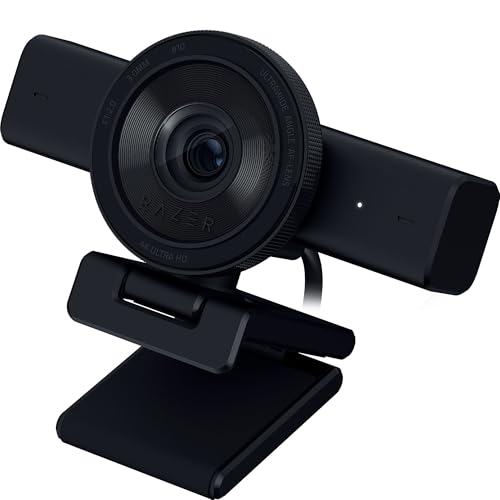
Razer Kiyo Pro Ultra HD

Razer

The Razer Kiyo Pro Ultra HD Webcam features a unique adaptive light sensor that guarantees sharp, detailed images in any lighting condition, setting it apart from competitors. This webcam offers full HD 1080p at 60 fps and an impressive field of view, making it perfect for streaming and video calls. Its adjustable light settings enhance your appearance for a polished look, all while its compact design makes it portable for on-the-go creators. Gamers and streamers alike appreciate its high frame rate and image quality that can elevate their broadcasts.
4.7Rated 4.7 out of 5 stars
Razer Kiyo Pro Ultra 4K Webcam: Large Sensor - Auto Light Correction - Built-in Mic and Shutter - Pro Grade Content Creation, Streaming, Gaming, Video Calls - Works with OBS, Xsplit, PC, Zoom, Teams
  • Adjustable brightness for every mood 💡

  • Pro-grade HDR for stunning visuals 🌈

Review Summary

90%

"The Razer Kiyo Pro Ultra HD is praised for its advanced low-light performance and customizable settings, appealing to gamers and content creators alike."

  • Stream like a star with built-in ring light ⭐

  • Adaptive light sensor

Tech-Savvy Living

Aesthetic & Personal Appeal

Recreational Enjoyment

The Razer Kiyo Pro Ultra HD Webcam features a unique adaptive light sensor that guarantees sharp, detailed images in any lighting condition, setting it apart from competitors. This webcam offers full HD 1080p at 60 fps and an impressive field of view, making it perfect for streaming and video calls. Its adjustable light settings enhance your appearance for a polished look, all while its compact design makes it portable for on-the-go creators. Gamers and streamers alike appreciate its high frame rate and image quality that can elevate their broadcasts.

  • Adjustable brightness for every mood 💡

  • Pro-grade HDR for stunning visuals 🌈

  • Stream like a star with built-in ring light ⭐

  • Adaptive light sensor

  • Full HD with high frame rate

Order Now
InceptionAI independently ranks and curates the best buying experience for Razer Kiyo Pro Ultra HD in USA. We recommend this Amazon option for the easiest, most reliable purchase — not necessarily the absolute lowest price, but the best overall experience. Click to proceed to the listing, or browse alternative top picks and ranking rationale on InceptionAI.
-7%$138.99USD
Live Deal$149.99
3
BEST PREMIUM

Elgato Facecam Pro

Elgato

The Elgato Facecam Pro provides a cutting-edge solution for content creators with its impressive 1080p resolution at 60 fps and advanced image processing technology. It is equipped with a custom Sony sensor that delivers remarkable detail and clarity, setting a new standard in webcam performance. The Facecam Pro also offers customizable settings via its software, enabling users to adjust their visuals to perfectly match their preferences. With an innovative focus on the needs of streamers and videographers, this webcam positions itself as a leader in the market.

4.6Rated 4.6 out of 5 stars
Elgato Facecam Pro, True 4K60 Ultra HD Webcam for Live Streaming, Gaming, Video Calls, Advanced Light Correction, DSLR Style Control, Wide Angle, Works with OBS, Teams,Zoom, PC/Mac, Black
  • Ultra-smooth 60fps for real-time fun 🎥

  • Customizable settings for the perfect look 🎨

Review Summary

92%

"Elgato Facecam Pro receives high marks for its ease of use and superior image clarity, often recommended by streamers for high-quality broadcasts."

  • Reliability that performs like clockwork ⏱️

  • 1080p60 resolution

Tech-Savvy Living

Self-Improvement & Personal Growth

Recreational Enjoyment

The Elgato Facecam Pro provides a cutting-edge solution for content creators with its impressive 1080p resolution at 60 fps and advanced image processing technology. It is equipped with a custom Sony sensor that delivers remarkable detail and clarity, setting a new standard in webcam performance. The Facecam Pro also offers customizable settings via its software, enabling users to adjust their visuals to perfectly match their preferences. With an innovative focus on the needs of streamers and videographers, this webcam positions itself as a leader in the market.

  • Ultra-smooth 60fps for real-time fun 🎥

  • Customizable settings for the perfect look 🎨

  • Reliability that performs like clockwork ⏱️

  • 1080p60 resolution

  • Built-in HDR support

Order Now
InceptionAI independently ranks and curates the best buying experience for Elgato Facecam Pro in USA. We recommend this Amazon option for the easiest, most reliable purchase — not necessarily the absolute lowest price, but the best overall experience. Click to proceed to the listing, or browse alternative top picks and ranking rationale on InceptionAI.
-14%$171.99USD
Live Deal$199.99
4
BEST FOR PROFESSIONALS

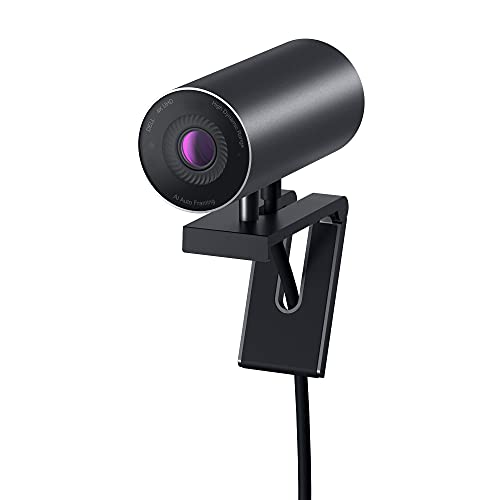
Dell UltraSharp 4K Webcam

Dell
Local Product

The Dell UltraSharp 4K Webcam distinguishes itself with its stunning 4K resolution and smart HDR capabilities, delivering lifelike clarity and color accuracy for video streaming and conferencing. It comes equipped with an intelligent light adjustment feature that ensures optimal visibility in varying light conditions. Additionally, its field of view can be adjusted, allowing users to frame themselves perfectly for any type of call or broadcast. With its robust build and professional-grade image quality, this webcam is a perfect choice for professionals seeking reliability and performance.
4.5Rated 4.5 out of 5 stars
Dell UltraSharp 4K Webcam
  • Ultra HD resolution 📸

  • Wide color gamut 🌈

  • Local Product

Review Summary

88%

"Dell UltraSharp 4K Webcam is celebrated for its sharp image quality and professional-grade features, making it ideal for business and creative professionals."

  • Perfect for creatives 🎨

  • 4K resolution for crystal-clear video

Intellectual Stimulation & Creativity

Tech-Savvy Living

The Dell UltraSharp 4K Webcam distinguishes itself with its stunning 4K resolution and smart HDR capabilities, delivering lifelike clarity and color accuracy for video streaming and conferencing. It comes equipped with an intelligent light adjustment feature that ensures optimal visibility in varying light conditions. Additionally, its field of view can be adjusted, allowing users to frame themselves perfectly for any type of call or broadcast. With its robust build and professional-grade image quality, this webcam is a perfect choice for professionals seeking reliability and performance.

  • Ultra HD resolution 📸

  • Wide color gamut 🌈

  • Perfect for creatives 🎨

  • 4K resolution for crystal-clear video

  • Built-in HDR with True Tone

  • Built-in HDR with True Tone

  • USB-C connectivity for high-speed data transfer

Reviews from the web

65 quotes · 12 sources · 2021–2024
  • “Still, the Dell UltraSharp WB 7022 is a hell of a webcam that easily ups your production value if you're willing to spend a little cash.”

    PC Gamer2023
  • “That’s the area of the market occupied by the Dell UltraSharp Webcam reviewed here. Costing around $200 / £175, the UltraSharp is a serious piece of kit for those who want the very best picture quality - making it one of the best 4K webcams money can buy.”

    Digital Camera World2022
  • “Bottom line: Dell's UltraSharp Webcam brings excellent, quality hardware to the increasingly competitive pro webcam market. But while the hardware is fantastic and the software is easy to use, it's still not better than the (now) cheaper Logitech BRIO 4K.”

    Windows Central2021
  • “Using this camera will a PC certainly provides an upgrade to any in-built webcam and puts many of the best webcams to shame. However, not all users will get to experience the full benefits and it does crucially lack a microphone.”

    T32021
  • “The Dell Ultrasharp webcam packs excellent quality with a generous feature list to make previous contenders like the Razer Kiyo Pro feel stingy by comparison.”

    Tom2021
  • “The Dell UltraSharp HDR 4K Webcam stands out for its exceptional video clarity and advanced features, making it a top choice for professionals seeking a premium video conferencing experience. Here are the pros based on customer feedback:”

    Mini PC Reviewer2024
  • “Overall, the Dell UltraSharp HDR 4K Webcam offers an impressive array of features that cater to both professional and casual users. With its superior video quality and thoughtful design, it is a worthy investment for anyone looking to elevate their video conferencing experience.”

    AmazingWebcams
  • “The native 78-degree horizontal field of view frames a single person nicely at typical desk distances (24-36 inches from camera). Wide enough to capture upper-body gestures and some desk context, narrow enough to avoid the “fisheye” feel of ultra-wide models.”

    Gaming PC Guru
  • “Part of what makes the AI auto framing so smooth is the autofocusing; they work hand-in-hand. The camera was always able to track my face and keep it in focus even in low light; that’s not the case with some webcams, which struggle with autofocus whenever you move around.”

    Input2021
  • “Certified for Microsoft Teams and Zoom, ensuring stable, predictable performance on the most common business platforms.”

    Review-Rating

Loved

35
  • +

    Easy setup and adjustment

    — T3
  • +

    The camera also uses magnets to attach to a pair of stands included in the box. The first is designed to clamp to the top of your monitor, while the second gives the webcam a tripod mount – this is best for laptop users, as the Dell’s weight may cause the lids of some...

    — Digital Camera World
  • +

    The Dell Ultra — Sharp is a beautiful piece of industrial design. Reminding us of the similarly-cylindrical Apple iSight webcam from almost 20 years ago (feeling old yet?), the Dell is an anodized aluminum device with a glass lens and magnetic cover that smartly attaches to the...

    — Digital Camera World
  • +

    Other features include a proximity sensor for automatically locking your computer when you step away, then using Windows Hello to log you back in using facial recognition.

    — Digital Camera World
  • +

    Physical design and excellent video quality are the main features of the Dell UltraSharp Webcam. The former is detailed in the next section, while the latter includes the use of a large, 1/2.8-inch Sony Starvis CMOS sensor with an 8.2-megapixel resolution, F2.7 aperture and HDR.

    — Digital Camera World
  • +

    Perhaps you are a C-suite member who needs to look their best when addressing dozens of staff, or a journalist who makes regular appearances on television from your home office.

    — Digital Camera World
  • +

    Thanks to the large sensor and high resolution, video quality is absolutely superb. It produces a picture that is among the best of any webcam we have ever used and, when viewed from the other end of a video call, isn’t too far behind that of a DSLR hooked up to a PC.

    — Digital Camera World
  • +

    The monitor mount allows for a lot of vertical adjustment, so you can point the camera up by 10 degrees and down by 20 degrees – handy if it’s placed on top of a wall-mounted screen in an office, where it can look down at a meeting table and get everyone in shot.

    — Digital Camera World
  • +

    Auto framing works really well

    — PC Gamer
  • +

    On the other hand, the Dell does a great job keeping me focused regardless of how often I bobbed around on camera as I told a silly anecdote about anime or how much sleep I'm not getting each night.

    — PC Gamer
  • +

    I like the cylindrical design of the webcam, which gives a different, more modern look than your typical wide-bodied webcam we've seen a million times before. The Ultrasharp has a magnetic privacy cap that sticks to the camera's back and front, which is incredibly convenient.

    — PC Gamer
  • +

    Dell makes use of magnets again as the included privacy lid simply sticks to the front glass, ensuring the camera cannot record anything. In a clever move, when not in use, Dell lets you slap it to the rear of the camera (also using magnets) so that you don't misplace it.

    — Windows Central
  • +

    Out of the box, you get a solid, hefty, tube-like camera. It's all machined anodized aluminum and eschews the plastics like in Logitech's cameras. The magnets are strong, won't shake loose, and are machined with precision.

    — Windows Central
  • +

    Connectivity is achieved through a Type-C to Type-A cable (the Type-C is for the camera; Type-A for the PC) that measures around 7 feet in length, more than enough for most setups. It's rubber, thick, and feels capable.

    — Windows Central
  • +

    Turning to the main point, the camera, and on paper, Dell again hits the right notes. A massive 8.3MP camera, Windows Hello, HDR, Sony sensor, 4K-capable — it's all great.

    — Windows Central
  • +

    Under Camera Control is AI Auto Framing, which is a real selling point. When enabled, it overrides the field of view preset, and it follows your face/body.

    — Windows Central
  • +

    It’s also got a good deal of convenience features, like separate, magnetically attachable mounts for tripods and monitors.

    — Tom
  • +

    Visually, though, this webcam is a treat to look at. Its aluminum body is a pleasant dark gray and doesn’t track fingerprints, plus its cylindrical shape makes it look more like something you’d find on a film set.

    — Tom
  • +

    Heavily customizable through software

    — Tom
  • +

    The Dell Ultra — Sharp webcam delivers on picture quality even in challenging lighting conditions

    — Input
  • +

    AI auto framing keeps you centered on screen during natural movement without needing manual adjustment.

    — Review-Rating
  • +

    Aluminum build looks and feels premium, sitting cleanly on a desk alongside Dell monitors.

    — Review-Rating
  • +

    Manual controls for sharpness, contrast, saturation, and brightness give power users real customization options.

    — Review-Rating
  • +

    Image quality is a substantial, visible step up from built-in laptop cameras.

    — Review-Rating
  • +

    Plug-and-play USB setup works immediately on modern systems without any driver installation.

    — Review-Rating
  • +

    Three field-of-view presets offer practical flexibility for solo calls and small group setups.

    — Review-Rating
  • +

    HDR processing keeps faces well-exposed even when sitting directly in front of a bright window.

    — Review-Rating
  • +

    Sony STARVIS CMOS sensor delivers noticeably cleaner video in low light compared to most webcams.

    — Review-Rating
  • +

    Compatible with most major UC platforms beyond just its two official certifications.

    — Review-Rating
  • +

    Privacy shutter cap and Windows Hello facial recognition enhance security.

    — Mini PC Reviewer
  • +

    Like a sturdy oak tree in a storm, the Dell UltraSharp webcam securely mounts on a standard tripod, ensuring stable and flexible positioning for excellent video capture. Its compatibility with tripods offers versatile setup options.

    — Mini PC Reviewer
  • +

    Equipped with 4K Sony STARVIS CMOS sensor for unparalleled video clarity.

    — Mini PC Reviewer
  • +

    Features AI Auto Framing technology for professional video conferencing.

    — Mini PC Reviewer
  • +

    Offers exceptional video quality with vibrant imagery.

    — Mini PC Reviewer
  • +

    Stunning 4K video quality with Sony STARVIS CMOS sensor

    — AmazingWebcams

Criticised

20
  • −

    No feature support for Mac users

    — T3
  • −

    Too heavy for laptop screens

    — T3
  • −

    We love the looks and feel of the Dell UltraSharp Webcam, but it’s certainly much larger than most of its rivals. This means a large imaging sensor lurks beneath – more on that later – but the size means it stands a fair bit above the top of your monitor.

    — Digital Camera World
  • −

    However, one major negative is the webcam’s lack of a microphone. Instead, you will have to plug in a USB microphone, or use your computer’s integrated mic, which probably won’t be all that good.

    — Digital Camera World
  • −

    There's no microphone which, honestly, I don't mind since I've yet to come across a webcam with an integrated microphone that doesn't sound like a tinny, cavernous audio nightmare. Another strange thing I've noticed is that the camera gets physically hot after long usage.

    — PC Gamer
  • −

    As much as I love the UltraSharp, the $200 price point will deter many people, especially if you've no desire to record video in native 4K. Despite that, it's a feature-rich webcam that always feels like a gateway drug to using a DSLR camera for streaming.

    — PC Gamer
  • −

    This camera does not have a built-in microphone. That's odd, but Dell makes a good point that most people who need a more "pro-level" webcam will also bring a higher quality microphone. It also makes for less confusion in Windows as to what is your default mic.

    — Windows Central
  • −

    While the Dell Ultra — Sharp tilts nicely up and down, it does not move side to side. It's not a deal-breaker, but a pivoting mechanism would have been beneficial.

    — Windows Central
  • −

    The default image settings for the Dell UltraSharp Webcam are not to my liking. The white balance seems slightly off, my skin looks redder than in real life, images are too soft, and the overall picture seems darker than other webcams.

    — Windows Central
  • −

    The second is the privacy cover, which instead of being integrated into the unit itself is a separate, magnetically attachable disc. Let’s face it, you’re going to put this down at some point and forget where you had it last, at which point your webcam loses its privacy shutter.

    — Expert Reviews
  • −

    That visual appeal might have negatively affected the build, however. Unlike most monitor mounts, this webcam’s monitor mount doesn’t have any feet on it, which means it can feel loose on your display.

    — Tom
  • −

    Monitor stand can feel insecure

    — Tom
  • −

    There is one odd omission in this otherwise full-featured package: there’s no included microphone. Embedded webcam mics are rarely great, but they’re a genuinely useful feature for users who spend time on video calls and don’t want to invest in a headset.

    — IGN
  • −

    Companion software is widely reported as clunky and adds unnecessary complexity for users who want simplicity.

    — Review-Rating
  • −

    Physically larger than several competing 4K options, which may feel bulky on smaller desks.

    — Review-Rating
  • −

    Full 4K output can be bottlenecked by older machines with limited USB bandwidth.

    — Review-Rating
  • −

    No built-in privacy shutter, which is a feature some buyers specifically look for.

    — Review-Rating
  • −

    Non-Windows users may encounter compatibility gaps that limit access to the full feature set.

    — Review-Rating
  • −

    The price is difficult to justify for anyone who does not rely heavily on video calls.

    — Review-Rating
  • −

    AI auto framing can over-crop or lag noticeably during quick or wide movements.

    — Review-Rating
Scroll for more
Order Now
InceptionAI independently ranks and curates the best buying experience for Dell UltraSharp 4K Webcam in USA. We recommend this Amazon option for the easiest, most reliable purchase — not necessarily the absolute lowest price, but the best overall experience. Click to proceed to the listing, or browse alternative top picks and ranking rationale on InceptionAI.
-8%$140.39USD
Live Deal$152.40
5
BEST BUDGET

AVerMedia PW513 Live Streamer CAM

AVerMedia

The AVerMedia PW513 Live Streamer CAM offers a unique blend of performance and versatility, providing stunning 4K Ultra HD resolution that caters to gamers and streamers alike. With its dual-lens system, it captures a wide-angle view while maintaining exceptional clarity, making it ideal for dynamic environments. This webcam also features advanced software that allows users to customize live streaming settings, including background removal and video effects. Its combination of easy setup and high-quality output makes it a compelling choice for anyone looking to enhance their online presence.

4.4Rated 4.4 out of 5 stars
AVerMedia PW513 Live Streamer CAM - 4K Ultra HD Webcam with Microphone for Gaming and Streaming, with CamEngine Software and USB Connection, TAA/NDAA Compliant
  • Perfect for live streaming, like a pro 🥇

  • Dual-color technology for true-to-life skin tones 🌈

Review Summary

86%

"AVerMedia PW513 Live Streamer CAM impresses with its excellent streaming features and reliable performance, preferred by many for its user-friendly design."

  • Plug-and-play ease, no setup stress 🔌

  • 1080p Full HD video

Tech-Savvy Living

Recreational Enjoyment

Time-Saving Convenience

The AVerMedia PW513 Live Streamer CAM offers a unique blend of performance and versatility, providing stunning 4K Ultra HD resolution that caters to gamers and streamers alike. With its dual-lens system, it captures a wide-angle view while maintaining exceptional clarity, making it ideal for dynamic environments. This webcam also features advanced software that allows users to customize live streaming settings, including background removal and video effects. Its combination of easy setup and high-quality output makes it a compelling choice for anyone looking to enhance their online presence.

  • Perfect for live streaming, like a pro 🥇

  • Dual-color technology for true-to-life skin tones 🌈

  • Plug-and-play ease, no setup stress 🔌

  • 1080p Full HD video

  • Wide-angle lens

Order Now
InceptionAI independently ranks and curates the best buying experience for AVerMedia PW513 Live Streamer CAM in USA. We recommend this Amazon option for the easiest, most reliable purchase — not necessarily the absolute lowest price, but the best overall experience. Click to proceed to the listing, or browse alternative top picks and ranking rationale on InceptionAI.
From $149.99USD

The best feature of 4K webcams is their unparalleled resolution, offering crystal-clear video quality that captures every detail, making them the ultimate choice for serious content creators.

InceptionAI finds the best product for you in the USA, with AI that answers to you, not advertisers.

Understanding 4K Webcams

4K webcams offer a range of features that improve visual clarity and user experience. Here is what you need to know about the benefits of upgrading to a 4K webcam.

Enhanced Resolution: 4K webcams provide four times the resolution of standard HD cameras, ensuring crystal clear visuals.

Better Low-Light Performance: Many 4K webcams are designed to perform well in low-light environments, perfect for those working in less-than-ideal lighting.

Wide Field of View: Most 4K webcams come with wide-angle lenses, allowing for more perspective in your streams or video calls.

Built-in Filters and Features: Many models include features like background removal or smart tracking, making them versatile for various uses.

AV Technology Advancement: 4K webcams use the latest technology, such as advanced image signal processing, to deliver higher accuracy and lower latency.

Increased Engagement: High-quality visuals significantly enhance viewer engagement in streaming scenarios, making 4K webcams essential for content creators.

Frequently Asked Questions

Which 4K webcam should I buy for streaming professionally?

Choose the Logitech Brio 4K Ultra HD Webcam for professional streaming and video conferencing, since it offers 4K Ultra HD resolution plus advanced HDR technology and dual omnidirectional microphones; it has an average rating of 4.8 and costs $149.99.

Does the Razer Kiyo Pro Ultra HD have an adaptive sensor?

Yes—the Razer Kiyo Pro Ultra HD includes an adaptive light sensor to keep images sharp in any lighting, and it supports full HD 1080p at 60 fps with an adjustable field of view; it’s rated 4.7 and priced at $138.99 USD

Is the Logitech Brio 4K worth $149.99 versus Elgato Facecam Pro?

The Logitech Brio 4K Ultra HD Webcam is $171.99 USDwith 4K Ultra HD resolution and dual omnidirectional mics, while the Elgato Facecam Pro costs $171.99 USDand offers 1080p60 with built-in HDR support; Brio is rated 4.6 vs 4.6.

Which webcam is better for low-light video calling—Brio or Kiyo?

For low-light performance, the Logitech Brio 4K Ultra HD Webcam includes automatic low-light correction, while the Razer Kiyo Pro Ultra HD uses an adaptive light sensor; Brio is rated 4.7 at $138.99 USDKiyo is rated 4.7 at $138.99 USD

Conclusion

In conclusion, 4K webcams are essential for anyone looking to improve their video quality and digital communication in the USA. We hope you found this guide useful! If you're looking for more specific information, feel free to use the search bar to explore additional options.

Don't see your product here?

If you're a brand owner wondering why your product isn't listed, we can help you understand our ranking criteria.

Learn why→

As an Amazon Associate and affiliate partner, InceptionAi earns from qualifying purchases. This does not influence our rankings. Our product search and market analysis are separate from the selling part.

Explore
ArticlesAbout UsContact UsCareers
Legal
Trademark PolicyPrivacy Policy
Region
Change RegionSitemap

Copyright © 2023-2026 InceptionAi Inc.

We answer to you, not advertisers.