Best Triple-Display Docking Stations in the USA for 2026 — Top 7 Picks
Published on Thursday, February 26, 2026
As workspace needs evolve in 2026, triple-display docking stations have become essential tools for professionals, creators, and power users who need expanded screen real estate without the clutter of multiple adapters. These docking stations let a single laptop or desktop drive three monitors while providing power delivery, fast data transfer, wired networking, and a variety of USB and audio ports. In the USA market, demand favors docks that combine Thunderbolt 4 and USB-C performance, support multiple 4K displays or mixed-resolution setups, and maintain consistent color and refresh rates for design, trading, and productivity workflows. Consumers choose triple-display docks for reliable multi-monitor performance, simplified cable management, cross-platform compatibility with Windows and macOS, and the convenience of a single connection that consolidates power, peripherals, and video. Modern buyers also look for features such as high-wattage power delivery, DisplayPort MST or DisplayPort Alt Mode handling, low-latency video output for creative and gaming tasks, and compact, durable designs that fit both home offices and corporate environments.
Top Picks Summary
- CalDigit TS4 Thunderbolt 4 Dock
- Dell Thunderbolt Dock WD22TB4
- Plugable UD-ULTC4K Triple Display Docking Station
- WAVLINK USB C Triple Display Docking Station UG69DK7
- Anker 675 USB-C Docking Station (12-in-1, Monitor Stand)
- Kensington SD5780T Thunderbolt 4 Dual 4K Docking Station
- UGREEN Revodok Pro 13-in-1 Triple Display Docking Station
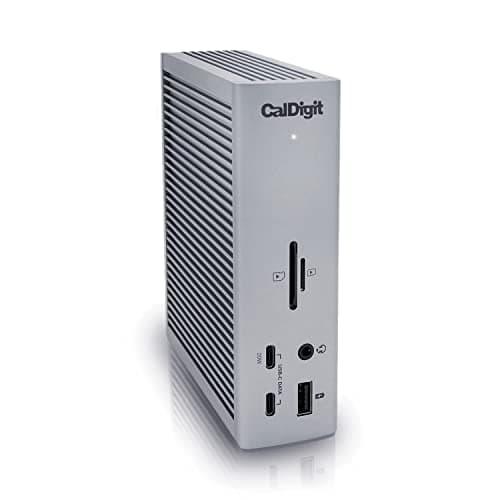
CalDigit TS4 Thunderbolt 4 Dock
The CalDigit TS4 Thunderbolt 4 Dock distinguishes itself with a remarkable array of ports and superior power delivery capabilities, offering up to 98W for charging laptops. It supports multiple 4K displays and delivers fast data transfer rates thanks to its Thunderbolt 4 compatibility. The compact design retains a professional aesthetic while providing excellent performance, making it ideal for creative professionals and power users alike. Its versatility and robust feature set set it apart from other docking solutions.
What Research and Industry Testing Say About Multi-Display Productivity
Multiple academic and industry studies, along with vendor and independent lab testing, find that multi-monitor setups and well-designed docking solutions can measurably improve productivity and reduce time spent switching between applications. For many knowledge-work tasks, adding additional screens cuts window switching, reduces cognitive overhead, and helps users keep key information visible. At the same time, ergonomic research highlights that properly positioned displays reduce neck and eye strain compared with awkward single-screen arrangements. Independent hardware testing also confirms that docks using Thunderbolt 4 or high-bandwidth USB-C with native DisplayPort pathways deliver the most reliable multi-display performance and color fidelity.
Productivity gains: Industry reports and controlled studies commonly report productivity improvements ranging from modest to substantial (often cited in the 10–50% range) depending on the task and how productivity is measured.
Ergonomics: Human factors and ergonomics research shows that multi-monitor configurations can reduce repetitive switching and postural stress when displays are positioned correctly.
Technical reliability: Lab and reviewer tests indicate that Thunderbolt 4 and docks with direct DisplayPort/Alt Mode support provide the most consistent multi-4K output and lower latency compared with display adapters that rely on software emulation.
Color and visual work: For color-critical work, docks that preserve GPU-driven signal paths and support hardware-level color profiles help maintain consistent color accuracy across monitors.
Frequently Asked Questions
Which triple-display dock should I buy for work?
Choose the Dell Thunderbolt Dock WD22TB4 for professional triple-display workflows, since it uses Thunderbolt 4 (40 Gbps) with high-power laptop charging for compatible Dell systems (up to ~130W) and has a 4.7 average rating.
Does the CalDigit TS4 support multiple 4K displays?
Yes—the CalDigit TS4 Thunderbolt 4 Dock supports up to 4 displays and includes Thunderbolt 4 certified connectivity for high-speed data transfer; it’s rated 4.6 and costs $349.99 USD
How does the Dell WD22TB4 price compare to Plugable?
The Dell Thunderbolt Dock WD22TB4 lists for $254.99 USDwhile the Plugable UD-ULTC4K Triple Display Docking Station lists for $233.95 USD; Dell is rated 4.4 and Plugable is rated 4.4, with both aimed at triple-display setups.
Is Plugable UD-ULTC4K good for three 4K monitors?
Yes—the Plugable UD-ULTC4K Triple Display Docking Station supports three 4K displays and includes multiple USB-A and USB-C ports; it has a 4.4 average rating and lists for $233.95 USD
Conclusion
In 2026 the triple-display docking station category in the USA gives users practical ways to expand productivity, support creative workflows, and simplify laptop setups. The top seven models on this page each offer strengths for different needs: the CalDigit TS4 Thunderbolt 4 Dock, Dell Thunderbolt Dock WD22TB4, Plugable UD-ULTC4K Triple Display Docking Station, WAVLINK USB C Triple Display Docking Station UG69DK7, Anker 675 USB-C Docking Station (12-in-1, Monitor Stand), Kensington SD5780T Thunderbolt 4 Dual 4K Docking Station, and UGREEN Revodok Pro 13-in-1 Triple Display Docking Station. For most professionals seeking the best mix of performance, connectivity, and longevity, the CalDigit TS4 Thunderbolt 4 Dock stands out as the best overall choice among these options. We hope you found this guide useful; if you want to refine by price, ports, or operating system compatibility, or expand your search to dual-dock or single-monitor solutions, use the search to narrow your results and find the perfect docking station.