

Top 5 Dual Monitor Docking Stations in the United States, 2025
Published on Saturday, March 29, 2025
Designed for multitaskers, dual monitor docking stations enable users to extend their display workspace efficiently, enhancing productivity without interruptions. In USA, as remote work and hybrid working arrangements become increasingly popular, the demand for ergonomic and efficient workspace solutions is surging. These devices not only allow users to connect multiple monitors but also streamline connectivity for various peripherals, such as keyboards, mice, and external drives. As a result, dual monitor docking stations have become a preferred choice for professionals seeking to boost their productivity and maintain a cohesive work environment.
Top Picks Summary
Dell WD19TB Thunderbolt Docking Station
The Dell WD19TB Thunderbolt Docking Station is a cutting-edge solution that provides exceptional power delivery and expansive connectivity options. It features multiple Thunderbolt 3 ports, enabling fast data transfers and supporting up to three displays. Its sleek design is not only functional but also complements any workspace, making it a top choice among professionals. With a single cable connection, users can enjoy seamless multitasking and superior performance, distinguishing it from other docking stations.

CalDigit TS3 Plus Thunderbolt Docking Station
The CalDigit TS3 Plus Thunderbolt Docking Station excels with its versatile connectivity options and high-speed performance. It offers a multitude of ports including USB-C, USB-A, HDMI, and DisplayPort, accommodating a diverse range of devices and accessories. Known for its robust build quality and reliability, it ensures a stable connection for creators and professionals alike. Its ability to deliver 87W power to laptops while simultaneously connecting multiple peripherals sets it apart in the docking station market.

Plugable UD-3900 Dual Display Universal Docking Station
The Plugable UD-3900 Dual Display Universal Docking Station stands out for its affordability while providing extensive functionality. It supports dual HDMI and DVI outputs, allowing users to easily connect two monitors for an enhanced productivity experience. Its plug-and-play setup makes it accessible to users of all skill levels, and compatibility with Windows and Mac systems broadens its appeal. With a single USB connection, it creates a versatile workstation without the complexity of numerous cables.

Wavlink USB-C Ultra 5K Docking Station
The Wavlink USB-C Ultra 5K Docking Station is engineered for high-resolution performance, supporting dual 5K displays for an unparalleled visual experience. It incorporates a wide range of ports including USB-C, USB-A, and Ethernet, catering to various peripheral needs. Its compact and modern design fits seamlessly into any workspace, while its ability to deliver high-definition video and data transfer sets it apart from competitors. Perfect for creative professionals and tech enthusiasts, it embodies cutting-edge technology.

Lenovo ThinkPad Hybrid USB-C with USB-A Dock
The Lenovo ThinkPad Hybrid USB-C with USB-A Dock uniquely marries innovative technology with exceptional functionality. It offers both USB-C and USB-A connectivity, making it an ideal choice for users with a variety of devices. Compact and portable, this dock supports multiple displays and a rich suite of ports for versatile connections. Its robust design and outstanding performance make it a reliable solution for on-the-go professionals who require efficiency and convenience.
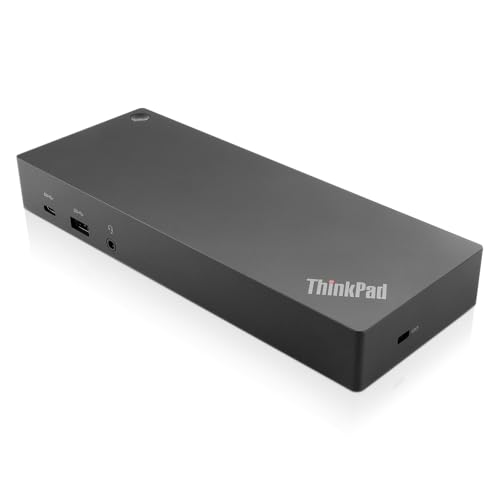
Support for multiple displays, robust graphics performance, and ergonomic design.
Understanding Dual Monitor Docking Stations
Dual monitor docking stations serve as multifunctional hubs that connect multiple displays and peripherals, seamlessly enhancing your productivity. Understanding their features and benefits can be crucial for making an informed decision.
Enhances Productivity: Research shows that dual screens can significantly increase productivity by up to 40%, allowing users to multitask more efficiently.
Improves Ergonomics: By providing a larger display area, dual monitor setups help reduce eye strain and promote better posture, making it easier to work for extended periods.
Simplifies Connectivity: With multiple ports for various devices, docking stations eliminate the hassle of connecting multiple cables and improve workspace organization.
Facilitates Collaboration: Dual monitor setups enable easier sharing of content during meetings, enhancing collaboration among remote team members.
Supports Higher Resolution: Many docking stations support 4K displays, offering superior visuals for design, video editing, and presentations.
Future-Proof Solution: Investing in a dual monitor docking station means you're prepared for evolving technology, supporting connectivity for the next generation of peripherals.
Frequently Asked Questions
Should I buy Dell WD19TB for dual 4K monitors?
Choose the Dell WD19TB Thunderbolt Docking Station if you want fast Thunderbolt 3 connectivity and dual 4K support; it supports dual 4K displays, has a 4.7 average rating, and costs $117.90 USD
What ports and display support does CalDigit TS3 Plus have?
The CalDigit TS3 Plus Thunderbolt Docking Station offers high-speed Thunderbolt 3 connectivity and supports up to three displays; it lists 10 ports and has a 4.6 average rating.
How does Plugable UD-3900 compare price-wise for dual monitors?
The Plugable UD-3900 Dual Display Universal Docking Station costs $99.95 USDversus $99.95 USDfor the Dell WD19TB and $99.95 USDfor the CalDigit TS3 Plus, while offering dual HDMI and DVI output for up to 1080p.
Does Plugable UD-3900 support dual HDMI and DVI outputs?
Yes—the Plugable UD-3900 Dual Display Universal Docking Station supports dual HDMI and DVI outputs for dual monitors up to 1080p, has a 4.3 average rating, and is priced at $99.95 USD
Conclusion
In conclusion, embracing a dual monitor docking station can significantly enhance your productivity in the United States, particularly in the evolving landscape of remote and hybrid work. We hope you found the information helpful. If you're looking for something more specific, feel free to use the search bar for tailored solutions.